🧾 收銀員操作教學Cashier Guide
負責攤位收銀、點單、收款。任何收銀員都能切換攤位互相支援。
Take orders and payments at a booth. Any cashier can switch booths to help others.
1登入系統Sign in
- 先輸入系統帳號密碼(由現場主管提供)。Enter the system account & password (given by your supervisor).
- 再用你個人的 4 位 PIN 登入,右上會顯示你的名字。Then sign in with your personal 4-digit PIN; your name shows top-right.
🔒 PIN 是個人身份,請勿外借或寫在公開處,所有收款會記在你名下。🔒 Your PIN is your identity — never share it. All sales are recorded under your name.
● ● ● ●
1
2
3
4
5
6
輸入個人 PIN(示意)Enter your PIN (illustration)
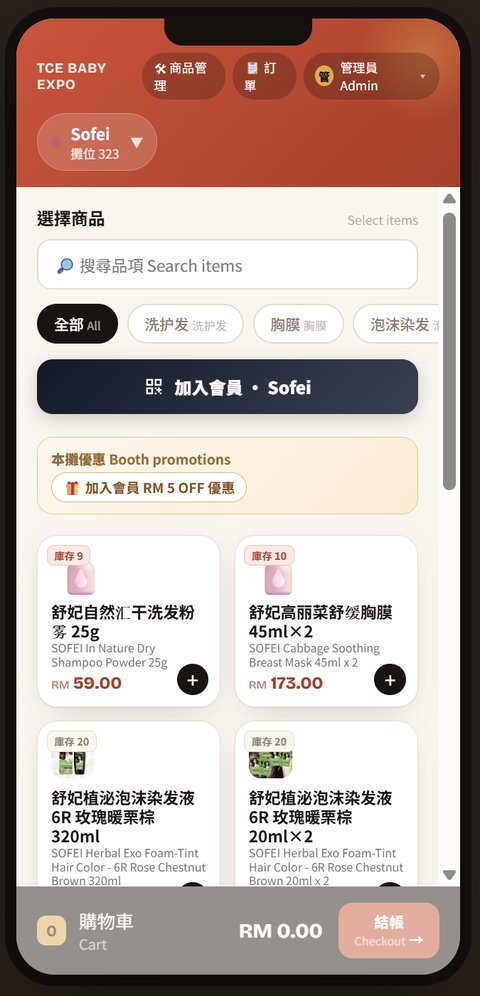
實際收銀畫面:上方品牌列(▼)可切換攤位Real cashier screen — tap the brand bar (▼) to switch booths
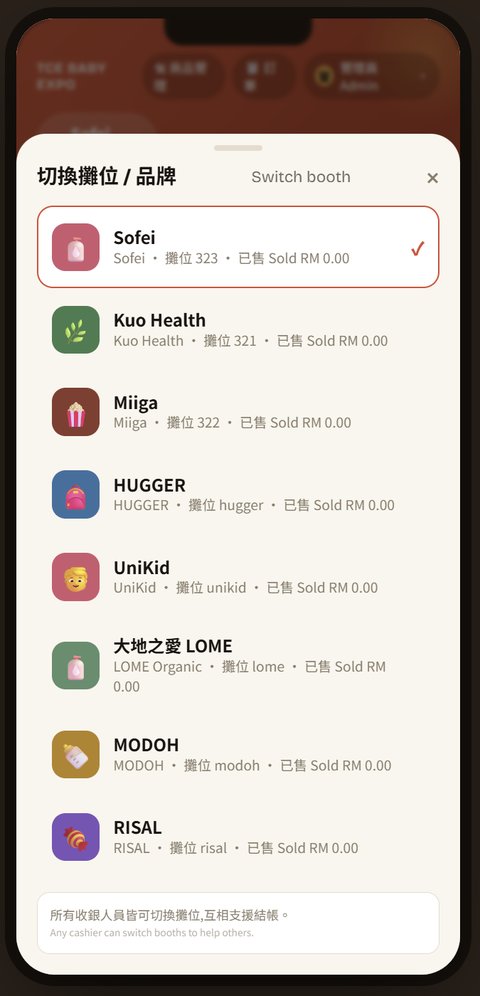
切換攤位面板:點任一攤位即可代收Booth switcher — tap any booth to serve it
2選攤位、點商品Pick booth & items
- 點上方品牌列(▼)切換到任何攤位 —— 可幫別攤客人結帳。Tap the brand bar (▼) to switch to any booth — you can serve other booths' customers.
- 點商品加入購物車;同一張單可跨多攤,系統自動分帳歸戶。Tap items to add; one order can span multiple booths — revenue is split automatically.
- 零售商品付款完成就直接交付。(標 食品 的品項只有餐飲攤位會用到,流程另見下方「🍳 餐飲攤位加開流程」。)Retail items are handed over once paid. (Items tagged Food only apply to food booths — see the "🍳 food-booth flow" below.)
3開購物車 → 結帳Open cart → checkout
- 畫面最下方的購物車列顯示件數與金額,點它打開。The cart bar at the bottom shows count & total — tap to open.
- 確認後按 前往收款。Confirm, then tap Go to payment.
購物車列固定在螢幕最下方,隨時看得到金額。The cart bar stays pinned at the bottom of the screen.
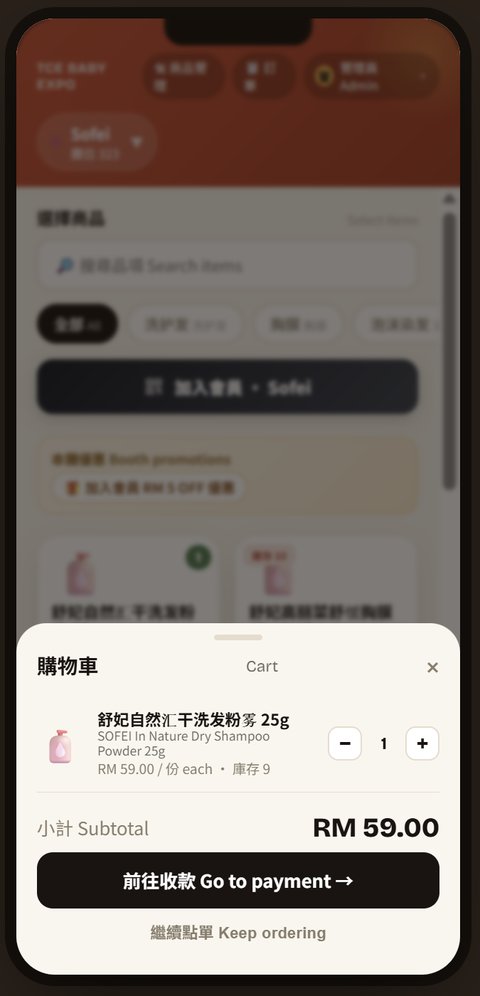
實際購物車:確認品項後按前往收款Real cart — confirm items, then Go to payment
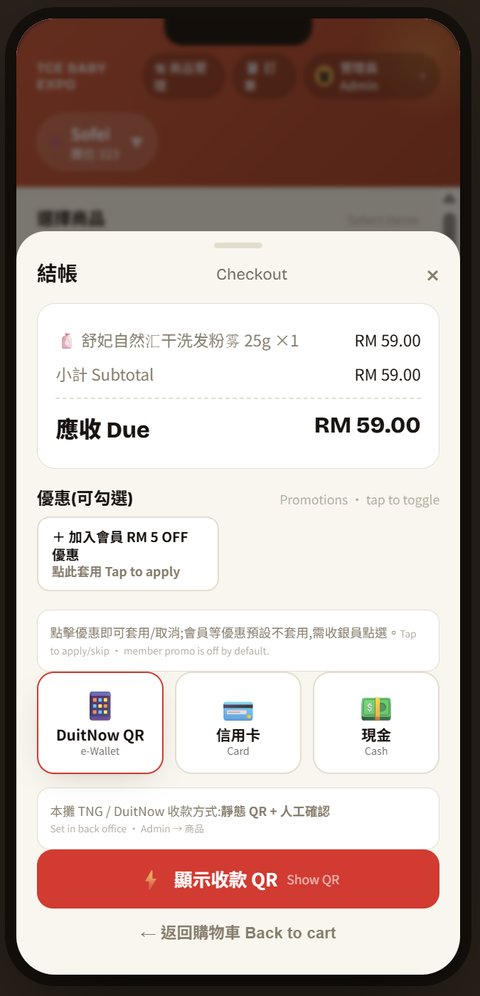
實際結帳畫面:DuitNow QR/信用卡/現金 + 可勾選優惠。現金/刷卡一律請客人到總收銀台Real checkout — DuitNow QR / Card / Cash + promo toggles. Cash/card: direct the customer to central
4選付款方式(TNG / 現金 / 信用卡)Choose payment (TNG / Cash / Card)
- 📱 TNG / DuitNow 掃碼:按「📱 QR」出示本攤收款 QR → 客人用 TNG eWallet 或任何銀行 App 掃碼付款 → 親眼確認客人手機上的「付款成功」畫面(金額+時間) → 再按確認收款。動態 QR 會自動對帳;靜態 QR 圖務必人工核對金額。📱 TNG / DuitNow QR: tap "📱 QR" to show the booth QR → customer pays with TNG eWallet or any bank app → see the SUCCESS screen (amount + time) on the customer's phone yourself before confirming. Dynamic QR reconciles automatically; with a static QR image always verify the amount.
- 💵 現金 CASH:攤位不收現金。按「送單待付款」→ 把單號(畫面顯示「取餐號碼」)給客人 → 請客人到總收銀台結帳付現,付款完成才交付商品。💵 CASH: booths do not take cash. Tap "Send to central" → give the customer the order number (shown as "Pickup No.") → direct them to the central cashier to pay; goods are handed over after payment.
- 💳 信用卡 CREDIT CARD:刷卡機在總收銀台。同樣按「送單待付款」→ 給單號 → 請客人到總收銀台刷卡結帳(插卡/感應,終端機顯示 Approved 才算完成)。💳 CREDIT CARD: the payment terminal is at central. Tap "Send to central" → give the order number → direct the customer to the central cashier to pay by card (insert / tap; done only when the terminal shows Approved).
攤位只當場收 TNG 掃碼;現金與刷卡一律請客人到總收銀台結帳。掃碼付款一定要看到客人手機上的成功畫面,不能只聽客人口頭說已付。Booths only take TNG QR on the spot; for cash and card, always direct the customer to the central cashier. For QR, you must see the success screen on the customer's phone — never take their word for it.
5兩種出單方式(零售)Two ways to send (retail)
- 當場收款(TNG 掃碼):客人在攤位掃碼付清 → 訂單立刻成立、當場交付商品。Pay now (TNG QR): customer pays by QR at the booth → order confirmed, hand over the goods on the spot.
- 先送單後付款(現金/刷卡):按「送單待付款」→ 給客人單號 → 請客人到總收銀台結帳 → 付款完成才交付商品;庫存已先預留。Send first, pay later (cash / card): tap "Send to central" → give the order number → customer pays at central → goods handed over after payment. Stock is reserved.
🍳 餐飲攤位(有出餐的食品)另有加開流程:付款完成後品項才會進廚房開始製作,廚房在「出餐看板 KDS」接單、做好按出餐,客人憑取餐號取餐。零售攤位可略過此段;廚房端完整操作見「🍳 出餐看板」分頁。🍳 Food booths (cooked items) have an extra flow: items enter the kitchen only after payment; the kitchen works from the KDS board and customers collect with the pickup number. Retail booths can skip this; see the "🍳 Kitchen" tab for the full KDS guide.
✅
訂單已送出Order submitted
取餐號碼Pickup No.
💰 請至總收銀台結帳💰 Pay at central102
💰 總收銀台操作教學Central Cashier Guide
集中收款、代收攤位送來的單、退款、以及每日開班/關班點鈔。
Central collection, settling booth orders, refunds, and daily shift open/close.
1每日開場:開班Start of day: open shift
- 到 收銀 (Cash) 頁按開班,輸入開帳現金(錢櫃備鈔)。Go to Cash, tap Open shift, enter the opening cash in the drawer.
- 有開班才能收現金;一天開一次。A shift must be open to take cash; open once per day.
狀態Status尚未開班No shift
開帳現金Opening RM 100
開班Open shift
叫出該單收款Collect order
#102 待結帳Unpaid
🧴 ×1 RM 49
🧴 ×1 RM 49
2代收攤位的單Collect booth orders
- 客人拿取餐號來付款 → 輸入取餐號叫出該單。Customer brings a pickup number → enter it to pull up the order.
- 可改品項、加點、套折價券,選現金/信用卡收款。You can edit items, add-ons, vouchers, then take cash/card.
- 收款後:零售當場交付;若是餐飲攤位,品項此時才進廚房製作(客人憑取餐號取餐)。營收於收款時計入。After payment: retail is handed over on the spot; food-booth items only now enter the kitchen (customer collects with the pickup number). Revenue counts at payment.
優惠(買一送一、六入18、爆爆珠買多送多)結帳時自動折抵。Promotions (BOGO, 6-for-RM18, buy-more-get-free) are applied automatically at checkout.
3跨品牌結帳 & 退款Cross-brand & refunds
- 跨品牌:一張單含多攤,一次收款自動分帳。Cross-brand: one order across booths, one payment, auto-split.
- 退款:已付款單可全/部分退,營收沖回、可退庫存。Refund: full/partial on paid orders; revenue reversed, stock optional.
- 作廢:未付款單可作廢,庫存自動退回。Void: unpaid orders can be voided; stock returns automatically.
#105 RM 80
部分Partial
全額Full
RM 5 ☑ 退庫存restock
確認退款Confirm refund
| 開帳Opening | RM 100 |
| 現金銷售Cash sales | RM 1,250 |
| 應有現金Expected | RM 1,350 |
| 實點Counted | RM 1,348 |
| 差異Variance | −RM 2 |
關班Close shift
4下班:關班點鈔End: close & count
- 系統算出應有現金(開帳+現金銷售+進出零用)。The system computes expected cash (opening + cash sales + pay-in/out).
- 點實際鈔票輸入,系統算差異。Count the cash and enter it; the system shows the variance.
- 按關班產生 Z 報表存查。Tap Close shift to generate a Z-report.
🍳 出餐看板 (KDS)Kitchen Display (KDS)
廚房螢幕,只顯示「已付款的餐飲訂單」,零售品不會進來。
Kitchen screen — shows only paid food orders. Retail items never appear.
1看板顯示什麼What it shows
- 只有已付款且含食品的單會出現。Only paid orders that contain food appear.
- 每張卡顯示取餐號、攤位、品項。Each card shows the pickup no., booth, items.
- 零售商品(🛍️)不進看板。Retail items (🛍️) don't enter the board.
未付款/待結帳的單不會進來,要客人在總台付款後才出現。Unpaid orders won't show until the customer pays at central.
#102 · Pinfood A-03 Food
🍚 ×1
→ 製作完成→ Ready
#101 · Pinfood A-03 可取餐Ready
🍚 ×1
✓ 已取餐✓ Done
製作中Making → 可取餐Ready → 已取餐Done
2出餐三步驟Three steps
- 餐點做好 → 按 製作完成。When cooked → tap Ready.
- 客人取餐後 → 按 已取餐 → 離開看板。After pickup → tap Done → it leaves the board.
- 看板自動更新,新單即時跳出。The board auto-refreshes; new orders pop up live.
取餐完成就按 Done,保持看板乾淨。Tap Done after pickup to keep the board clean.
🔒 每日結算 (Settlement)Daily Settlement
由管理員/總收銀台執行。每日營業結束封存當天各品牌營收。
Done by admin/central. Locks each brand's daily revenue at end of day.
1每日開場:設營業日Start: set business day
- 每天開場到後台 營運 (Ops) 把營業日設成當天。Each morning, in Ops, set the business day to today.
- 當天訂單都會歸到這個營業日。All orders count toward that business day.
展期 3 天,每天開場都要更新。3-day event — update it every morning.
營業日Business day
2026-06-12
設定為今天Set to today
| 品牌Brand | 營收Gross | 退款Refund | 淨額Net |
|---|---|---|---|
| Pinstore | 1,200 | 0 | 1,200 |
| Pinfood | 860 | 20 | 840 |
結算並封帳Close & lock
2每日結尾:結算封帳End: close & lock
- 先確認各收銀台都已關班點鈔。First make sure all cashiers have closed & counted.
- 到後台 結算 分頁,看各品牌營收/退款/淨額。In Settlement, review each brand's gross/refund/net.
- 按 結算並封帳 → 當日帳目鎖定。Tap Close & lock → the day is locked.
3封帳後的規則After locking
- 封帳後當天訂單/退款/庫存不能再改。Once locked, that day's orders/refunds/stock can't be changed.
- 要更正:先解鎖,改完再封帳。To correct: unlock first, fix, then lock again.
- 可匯出報表 CSV / Excel / PDF。You can export reports as CSV / Excel / PDF.
封帳=撥款依據,確認金額無誤再按。Locking = basis for payout — verify amounts first.
06-12 Pinstore🔒 已封帳Locked
解鎖(更正)Unlock
CSV
Excel
PDF
✅ 每日收尾檢查清單End-of-day checklist
- ☐ 各收銀台關班、點鈔☐ All cashiers closed & counted
- ☐ 待結帳/未付款單處理完☐ Unpaid orders cleared
- ☐ 後台結算封帳☐ Settlement locked
- ☐ 匯出當日報表存檔☐ Reports exported & saved
- ☐ 明天開場更新營業日☐ Update business day tomorrow
當日帳目已封存Day locked & saved